devops
GitHub Copilot managed settings: control the harness and share plugins
Giving everyone a Copilot license is one thing. Deciding what its agents can do—and how teams share useful practices—is another.
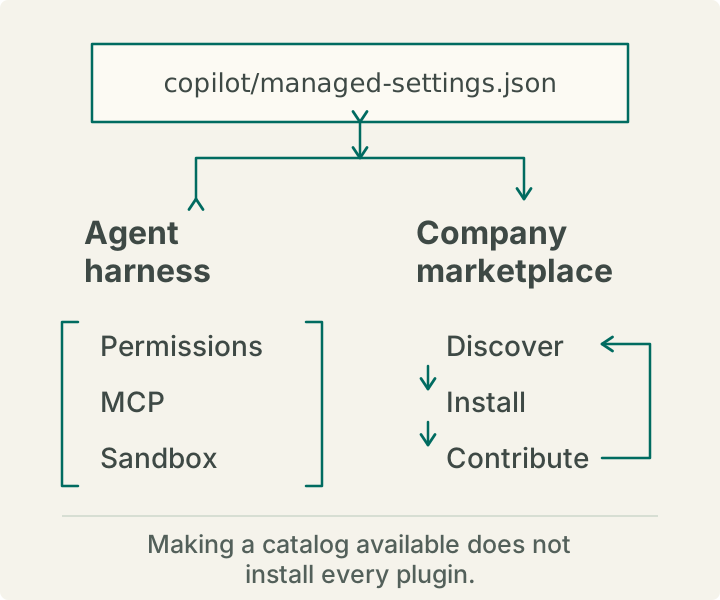
I tested enterprise-managed settings with a team override, then explored a company plugin marketplace. The same copilot/managed-settings.json can set boundaries for the agent harness and make shared plugins available.
The harness is the client and runtime that let an agent use tools. The marketplace helps teams share plugins; making a catalog available does not install every plugin.
Set up the baseline
For server-managed settings, an enterprise owner selects an organization’s .github-private repository as the governance source. Store the file at:
.github-private/
  copilot/
    managed-settings.json
Commit changes to the default branch. The baseline applies to people who receive Copilot through the enterprise or its organizations, even if they cannot read the repository. Protect it with reviews and rulesets. GitHub’s setup guide covers source selection and validation.
Managed settings do not assign licenses or replace enterprise and organization policies. See GitHub’s policy overview.
Check GitHub’s managed-settings reference for client support. Changes can take about an hour to arrive; restarting or signing in again triggers a refresh.
Test with a team override
In my pilot, I mapped a test team to its own settings file. This let me test team-specific behavior without changing the baseline for everyone.
Team overrides work with server-managed settings. The baseline still goes to eligible users, while an override changes selected settings for mapped team members. GitHub maps each team to a file under copilot/teams/. A team file can change only keys the baseline marks overridable; enabledPlugins is additive. To vary marketplaces by team, mark extraKnownMarketplaces as overridable in the baseline.
An unset key keeps its enterprise value. Replacing one supported key does not erase the rest of the baseline or other enterprise policies.
GitHub validates the settings file, team mappings, and mapped team files. Still, check effective settings in a client before widening access. Compare a test-team member with someone outside it, and check members of multiple teams: matching team settings combine using the least restrictive value for each key, subject to platform decisions. See GitHub’s team override guide.
Set boundaries for the harness
Start with controls that fit the work. The managed-settings reference lists available keys.
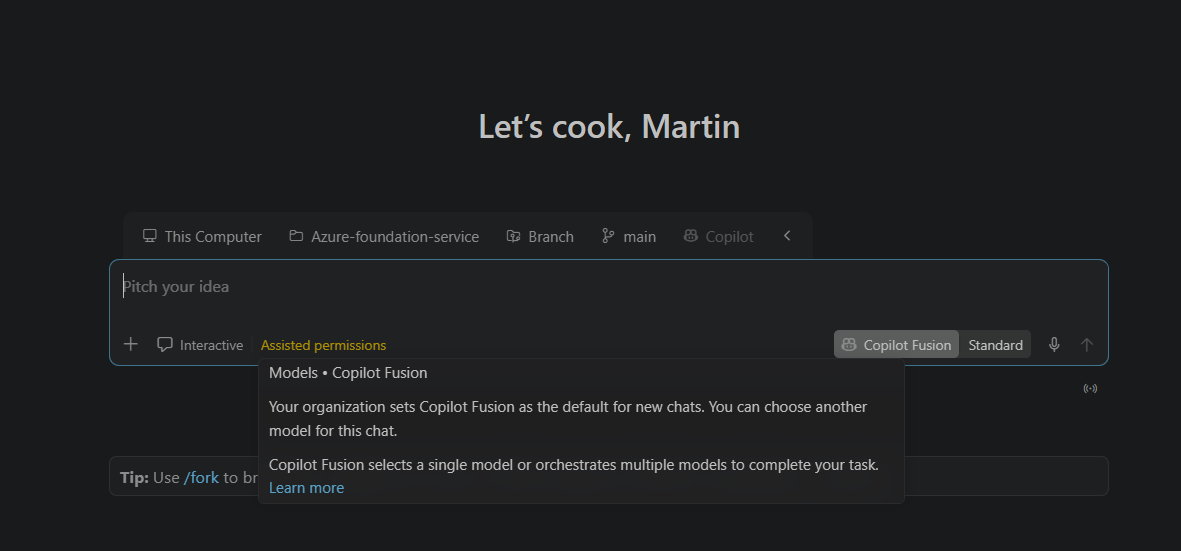
For example, this starter defaults new conversations to Fusion while letting an enterprise team override the model:
{
  "model": {
    "overridable": "fusion"
  },
  "permissions": {
    "disableBypassPermissionsMode": "disable",
    "deny": ["Shell(git push *)"]
  }
}
The overridable wrapper lets a mapped enterprise team replace the default in its team settings file. This is a team-level setting, not a permission gate for developers. Even with Fusion as the default, a developer can choose another available model for a conversation, subject to plan and administrator policies. GitHub describes Fusion Standard as balancing cost, quality, and latency, with one model selected per task. Fusion usage costs depend on the models it uses and any applicable pricing promotions; higher effort levels can use more than one model. It may lower costs in some workflows, but not all. Compare usage and results before claiming savings (Fusion; usage optimization).
disableBypassPermissionsMode prevents bypass or YOLO-style allow-all behavior. A deny rule blocks a matching operation; ask can require approval, and allow can permit one without a prompt. The order is deny, ask, then allow. These settings are not a complete security boundary: keep credential, network, repository, and human-review controls in place.
Managed settings can also restrict MCP servers and local sandbox behavior where supported. Limits depend on the client and runtime; an MCP allowlist or sandbox does not cover every integration or way to run code.
Set up the company marketplace
Here, “marketplace” means a Copilot plugin catalog, not GitHub Marketplace or the VS Code extension marketplace. A plugin can package skills and other components.
We do not keep plugin code in one central repository. The company marketplace is the catalog: teams maintain plugins in their own repositories, and the catalog points people to them. Its manifest is .github/plugin/marketplace.json. For example, a repo-release-readiness listing can point to a plugin in a community repository at .github/plugins/repo-release-readiness.
Register the catalog in managed settings so people can discover it:
{
  "extraKnownMarketplaces": {
    "company-marketplace": {
      "source": {
        "source": "github",
        "repo": "COMPANY/company-marketplace"
      }
    }
  }
}
The names here are anonymized. The catalog’s name must match the company-marketplace identifier in settings. Making the catalog known does not install or enable every plugin. People can choose what to install; access to a plugin’s source repository is a separate permission.
To require a plugin, set its plugin-name@marketplace-name entry in enabledPlugins to true; false requires it to be disabled. If you need to restrict plugin sources, strictKnownMarketplaces limits installation to listed catalogs; an empty list blocks them all. Keep adoption optional unless a plugin needs to be mandatory. See GitHub’s marketplace management guide.
People installing from a private marketplace need repository access and client sign-in, even though receiving governance settings does not require access to the settings repository.
Let teams contribute
Anyone in the company can propose a catalog entry through a pull request. Add or update a listing in the catalog manifest; each entry names the plugin and its GitHub repository, ref, and directory. The plugin stays with its maintainers.
The contribution guide asks contributors to include the source and ref, use a stable ref where possible, and validate the manifests. It also welcomes catalog documentation updates. Teams can improve the catalog through a pull request or propose a change in a plugin’s own repository. Give each plugin an owner and test updates before wider use.
Managed settings set harness boundaries; a marketplace helps people find and improve shared tools. They serve different purposes. I’ll cover plugin packaging in a follow-up.
Further reading
- Getting started with enterprise-managed settings
- Managed-settings reference
- Overriding settings for enterprise teams
- Creating and sharing a plugin marketplace
Next: OpenTelemetry
I’ll cover OpenTelemetry in a separate post, including the endpoint, protocol, capture, captureContent, serviceName, and resourceAttributes properties. See GitHub’s full telemetry schema; review what you capture and keep credentials out of the settings file.