operationsmanager
Update: SCOM web API
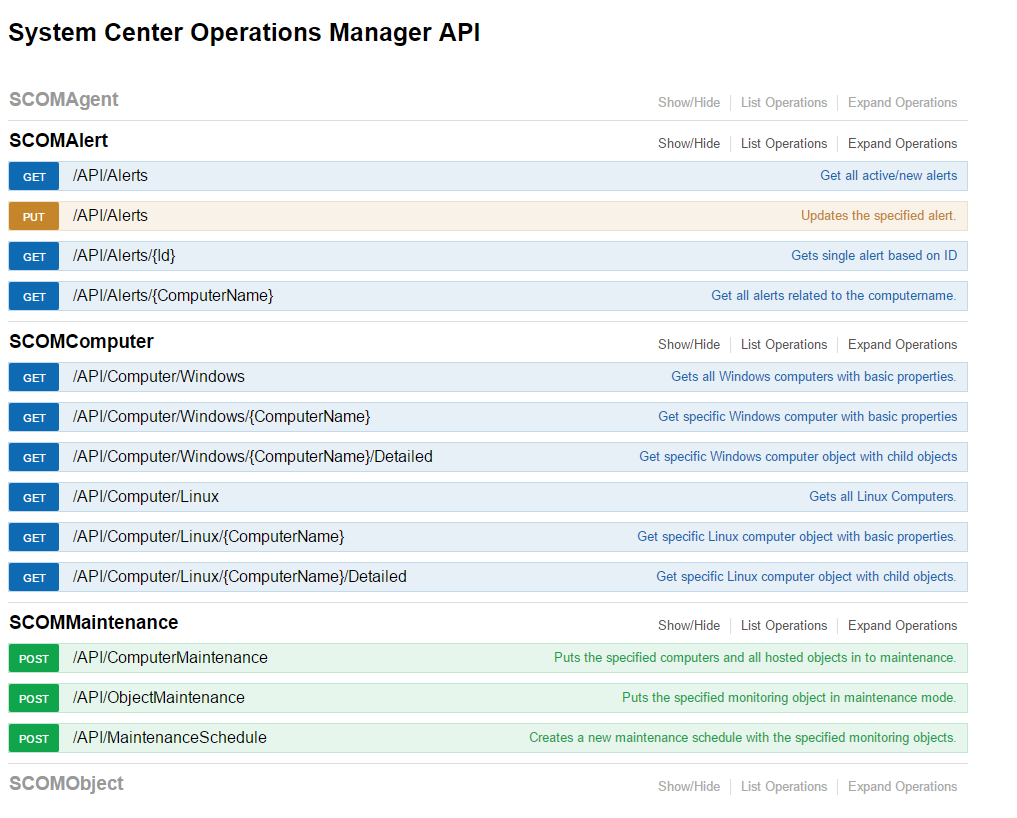
Big updates:
I have made a lot of changes to the SCOM web API. As you can see from the picture above. Maintenance scheduling is added, which means you can create a new maintenance schedule in SCOM 2016. To the computer endpoints I have added the a possibility to get detailed information. This will list all related object to the server. Logical disks, network cards etc. These are the API endpoints available at the moment:
Agents
Route Description
[GET] API/Agents Gets all agents
[GET] API/Agents/{id} Get a single agent
Alerts
Route Description
[GET] API/Alerts Gets all open alerts
[GET] API/Alert/{id} Get a single alert
[PUT] API/Alert Update the specified alert with resolution state, TicketId
[GET] API/Alert/{ComputerName} Get all alert from specific computer, use IncClosed=true to include open and closed alerts
Computer
Route Description
[GET] API/Computer/Windows Get all windows computers wit basic properties
[GET] API/Computer/Windows/{ComputerName} Get A single windows computers with basic properties
[GET] API/Computer/Windows/{ComputerName}/Detailed Get A single windows computers with hosted child objects
—— ——
[GET] API/Computer/Linux Get all Linux computers wit basic properties
[GET] API/Computer/Linux/{ComputerName} Get A single Linux computer with basic properties
[GET] API/Computer/Linux/{ComputerName}/Detailed Get A single Linux computers with hosted child objects
Maintenance
Route Description
[POST] API/ComputerMaintenance Put the specific computer object and all child in maintenance mode
[POST] API/ObjectMaintenance Put the specific monitoring object and all child in maintenance mode
[POST] API/MaintenanceSchedule Create a new maintenance schedule. SCOM 2016 ONLY
Object
Route Description
[GET] API/MonitoringObject/{id} Get a monitoring object and all child object
Examples
Create a new maintenance schedule by sending a post to /API/MaintenanceSchedule with a body including object id, start date and end date in UTC, optionally a comment. #CREATE A MAINTENANCE SCHEDULE WITH TWO OBJECTS. Time in UTC
$body = @” { “scheduleName”: “new maintenance schedule”, “id”: “a43a5b09-5c32-8624-1427-73b8e1f05248”, “StartTime”: “2017-05-30T13:53:33.550Z”, “EndTime”: “2017-05-30T14:53:33.550Z”, “comment”: “TicketID” } ”@
Invoke-RestMethod -Uri ‘http://localhost:64049/API/MaintenanceSchedule’ -Method Post -Body $body -UseDefaultCredentials -ContentType ‘Application/json’
Get details/related object from a computer:
Invoke-RestMethod -Uri ‘https://host/API/Computer/windows/computer.fqdn/Detailed’ -UseDefaultCredentials
Which will return something like this. Notice the relatedObjectsCount and relatedObjects
