operationsmanager
Web API for System Center Operations Manager
The SCOM web API is updated, see this post You will always find the latest SCOM Web API release on GitHub System Center Operations Manager (SCOM) is a widely used monitoring platform and one of its advatages is the ability to custom author monitoring through management pack development. With a ‘cloud first’ approach most systems is able to do information exchange or integration through a web-based API, often reffered to as a REST API. SCOM have many ways to exchange information and the System Center Suite also have an integration platform call System Center Service Provide Foundation (SPF) which you can read more about here To support a more light weight integration platform i decided to start my first C# project and develop a web-based API for SCOM that supported the daily used “functions”. Thanks to my colleague @RudiMartinsen i managed to create a working solution.
API Endpoints
- [GET] Agents (Admin privileges required)
Get all agents
-
single based on Guid
-
[GET] Alerts
Gets all alerts
- single based on Guid
- Single based on ComputerName
Include ‘closed’ with IncClosed=true
- [PUT] Alerts
Update a single alert with resolution state and/or ticket id
-
Monitor generated alerts will be resett if 255 (closed) is sent as resolution state
-
[GET] WindowComputers
Get all partial monitoring object from the Windows Computer class
-
Single based on ComputerName
-
[POST] ComputerMaintenance*
Maintenance mode a Windows Computer for a specific # minutes
- [GET] MonintoringObject/{id}
Get a single monitoring object based on ID (Guid)
I have uploaded the source project on GitHub and hopefully our community can continue to develop and introduce new features missing in this release.
Installation
There are two versions of the API. One without user impersonation and one where this is available. To install the version with user impersonation enabled. Do the following on a SCOM Management server
- Download the project or .zip file from GitHub
- Copy the required .dll from your management server (\Operations Manager\Server\SDK Binaries) to the web api Bin folder
Microsoft.EnterpriseManagement.Core.dll
-
Microsoft.EnterpriseManagement.OperationsManager.dll
-
Microsoft.EnterpriseManagement.Runtime.dll
-
Create a new web site and set physical path to where you extracted the files
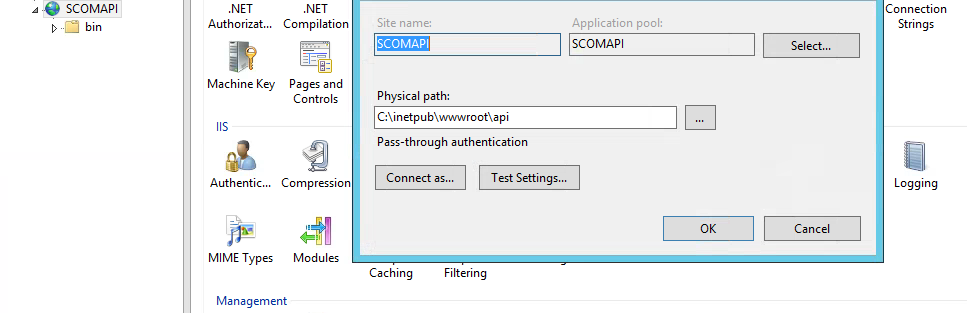
- Enable windows authentication (and basic if you want)
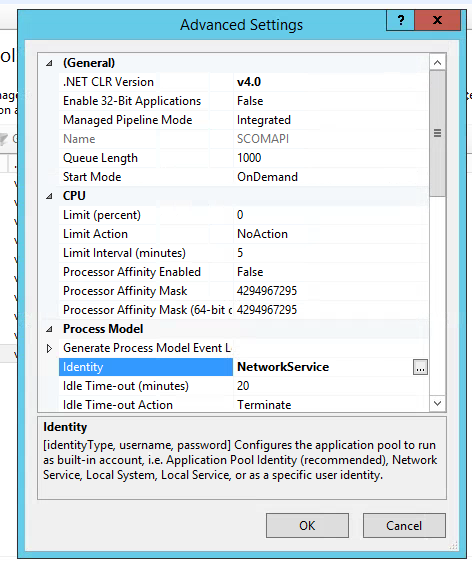
- Set your Application pool to use network service identity
Examples
Using powershell here are a few examples on how you can use the API
Get Alerts
#Get all alerts Invoke-RestMethod -Uri ‘http://localhost:64049/Api/alerts’ -UseDefaultCredentials
#Get a single alert Invoke-RestMethod -Uri ‘http://localhost:64049/Api/alerts?id=4a6f29e3-f4b5-4883-a3f2-97eb3be50c12’ -UseDefaultCredentials
#Get alerts specified with computername Invoke-RestMethod -Uri ‘http://localhost:64049/Api/alerts?ComputerName=COMPUTERNAME.fqdn’ -UseDefaultCredentials
Put a computer in to maintenance
PS C:\Users…> $json = @” { “DisplayName”: “COMPUTERNAME.fqdn”, “Minutes”: 10, “comment”: “I believe this is working” } ”@
Invoke-RestMethod -Method POST -Uri ‘http://localhost:64049/API/ComputerMaintenance’ -Body $json -UseDefaultCredentials -ContentType ‘Application/json’
Returns DisplayName Minutes EndTime comment
COMPUTER NAME.fqdn 10 2017-05-05T08:42:56.5938294Z I believe this is working
Get a monitoring object
#Get a monitoring object Invoke-restmethod -uri ‘http://localhost:64049/API/MonitoringObject/cb191c1a-47dc-3c51-3686-9f66dd59f187’ -UseDefaultCredentials
displayName : D: healthState : Success inMaintenance : False stateLastModified : 23.03.2017 15.39.23 classes : path : MyComputerHostingThisDisk.fqdn
Limitations*
- SCOM .dll files will need to copied manually in to the web api application folder as I assume im not allowed to redestribute these.